
参考URL#
http://qiita.com/takeswim/items/d80dcf9865d06571cc5e
[code lang=”bash”]
$ cat /etc/redhat-release
CentOS Linux release 7.2.1511 (Core)
[/code]
事前準備#
[code lang=”bash”]
$ yum install vim git gcc wget make
[/code]
Rubyのインストール#
システムRubyの2.0.0だとrakeで怒られたので、2.3.3をインストールすべく、rbenvを導入。
導入手順は下記の通り。
http://wiki.inamuu.com/index.php?cmd=read&page=Ruby%E3%81%AE%E3%82%A4%E3%83%B3%E3%82%B9%E3%83%88%E3%83%BC%E3%83%AB&word=rbenv
nginxのインストール#
[code lang=”bash”]
$ yum install pcre-devel zlib-devel
$ wget http://nginx.org/download/nginx-1.11.8.tar.gz
$ tar xfvz nginx-1.11.8.tar.gz
$ cd nginx-1.11.8
$ ./configure –prefix=/usr/local/nginx
$ make
$ make install
$ groupadd nginx
$ useradd -g nginx -s /sbin/nologin nginx
$ mkdir -p /var/cache/nginx/uwsgi_temp
$ nginx -t
$ nginx
[/code]
ngx_mrubyの導入#
[code lang=”bash”]
$ yum install bison
$ cd /usr/local/src
$ git clone git://github.com/matsumoto-r/ngx_mruby.git
$ cd ngx_mruby/
$ ./configure –with-ngx-src-root=/usr/local/src/nginx-1.11.8
$ make build_mruby
$ make generate_gems_config
$ cd /usr/local/src/nginx-1.9.9
$ ./configure –user=nginx –group=nginx –prefix=/etc/nginx –sbin-path=/usr/sbin/nginx –conf-path=/etc/nginx/nginx.conf –error-log-path=/var/log/nginx/error.log –http-log-path=/var/log/nginx/access.log –pid-path=/var/run/nginx.pid –lock-path=/var/run/nginx.lock –http-uwsgi-temp-path=/var/cache/nginx/uwsgi_temp –with-http_ssl_module –with-mail –with-http_stub_status_module –with-http_v2_module –with-http_realip_module –with-http_addition_module –without-http_userid_module –add-module=/usr/local/src/ngx_mruby –add-module=/usr/local/src/ngx_mruby/dependence/ngx_devel_kit
$ make
$ make install
[/code]
[code lang=”ruby”]
$ vim /etc/nginx/nginx.conf
— snip —
location / {
root html;
mruby_content_handler_code ‘
Nginx::rputs “Hello ngx_mruby!!”
‘;
#index index.html index.htm;
}
— snip —
$ nginx -t
$ nginx -s reload
[/code]
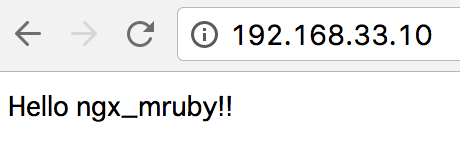
こんにちはngx_mruby.